

RiskyProject is integrated with most popular project management and project management software. RiskyProject integrated solutions including RiskyProject Addin Microsoft Project as well as integration with Oracle Primavera, MindView by MatchWare, Aurora by Stottler Henke, and many other software. RiskyProject is also integrated with Microsoft Excel and Microsoft PowerPoint.
Microsoft Project

Project Risk Analysis with Microsoft® Project
RiskyProject seamlessly integrates with Project 2003 and higher. When RiskyProject is installed it checks if Project is installed on the computer and adds a RiskyProject toolbar and macro to Project. Using this toolbar you may transfer your project schedule to RiskyProject, add risks and uncertainties and perform the analysis. Your schedules in Project and RiskyProject are fully synchronized: if you change schedule in Project it will be reflected in RiskyProject. As a result, all the risks and uncertainties defined in RiskyProject will be linked to your Project schedule.
Oracle® Primavera

Project Risk Analysis with Oracle® Primavera
RiskyProject is designed to easily integrate with Oralce Primavera Project Management software. RiskyProject can read Primavera project schedules and perform project risk analysis Results of analysis can be exported back to Primavera software.
SNA Software

Project Risk Analysis with SNA Proteus Envision
RiskyProject now integrates directly with SNA’s Proteus Envision platform reading IPMDAR or other data from the Envision normalized data and performing cost and schedule risk analysis, risk management and risk handling. The results of the RiskyProject’s analysis can be integrated directly into the Proteus Envision analysis views and dashboard providing project stakeholders with a comprehensive view of their project status.
Aurora by Stottler Henke

Project Risk Analysis with Aurora by Stottler Henke
The Aurora(TM) intelligent project scheduling software combines a variety of scheduling techniques, intelligent conflict resolution, and automated decision support to generate shorter schedules for resource-constrained critical-path projects. Almost 20 years of R&D have gone into Aurora’s development, mostly to meet many of NASA’s toughest planning & scheduling challenges. Aurora also includes the world’s most advanced multi-project Critical Chain implementation. Aurora’s scheduling engine can be seamlessly integrated with off-the-shelf scheduling tools (e.g., Primavera, MS Project, Deltek Open Plan); and can read and write data to RiskyProject.
RiskyProject Integration with ScheduleReader and Seavus Project Viewer
ScheduleReader™ is a standalone desktop application for viewing XER, XML and XLS project schedules. It is designed to replace the flow of sharing project data as static PDF files, by delivering a detailed and dynamic view of data contained in schedule files, which can be easily filtered, organized and shared among all parties involved in a project.
Seavus Project Viewer is the leading and most complete viewer for Microsoft Project mpp files, intended for all project team members and employees that need to open and view the project plans in .mpp file format. It supports 100% of the views available in MS Project, includes the professional graphical reports, and offers multiple sharing options like SharePoint integration. It is a professional yet cost-effective solution that provides a familiar user interface thereby eliminating the learning curve and training costs for the project organizations and companies.
RiskyProject can be used together with ScheduleReader and Seavus Project Viewer as part of one solution.
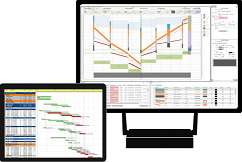
Risk Analysis of Linear Projects with Turbo-Chart
In linear projects activities are associated with certain locations. They are usually construction projects, such as building and roads where each activities have location attributes in addition to duration, start and finish times, cost, resources and other attributes of traditional project schedules. Time location charts are a way of visualizing project schedules with linear locations on the horizontal axis, and dates on the vertical axis. Schedule activities are then plotted onto the chart according to the locations over which they occur and the dates that the project schedule determines.
Time location charts could be presented for original project schedule and risks-adjusted project schedule. Risk adjusted project schedule is a result of project risk analysis. Comparing risk adjusted project schedule and original project schedule helps to determine how risks would affect your project.
Results of project risk analysis performed in RiskyProject can be presented using Turbo-Chart software by Linear Project Software. Please review our presentation how integrated RiskyProject – Turbo-Chart solution would help to analyze and visualize your linear schedule.