

Frequently Asked Questions and Project Risk Management and Risk Analysis Software RiskyProject
RiskyProject Features
- What is RiskyProject?
- Do I need Microsoft® Project or any other scheduling software to run RiskyProject?
- Can I use RiskyProject with Oracle® Primavera?
- What is the Event Chain Methodology?
- What is the difference between RiskyProject Lite and RiskyProject Professional?
- What types of risk events does RiskyProject support?
- Can I share risk register between different users in my organization?
- When should I correlate risks and how do I do it?
- Can I define task duration using statistical distribution?
- How does tracking in RiskyProject work?
- How can I perform Earned Value Management using RiskyProject?
- How should I use the risk register?
- How do I assign risks to tasks?
- How can I update a project schedule from Microsoft Project and keep my assigned risks?
- How do I rank schedule related and non-schedule risks together?
- How do I plan a risk response?
- How can I compare mitigation efforts using different baselines?
- How many iterations are required in a simulation?
- When should I use a risk event instead of a statistical distribution?
- What are mutually exclusive alternatives for risks and how are they calculated in RiskyProject?
Purchasing and Licensing RiskyProject
- How much does RiskyProject software cost?
- Does RiskyProject require purchase of annual maintenance?
- Do you have academic and corporate licensing of RiskyProject?
- Do you accept credit cards for payments?
- How RiskyProject is licensed?
- I received my RiskyProject license number. How should I validate it?
- I have RiskyProject version 1.3. Can I receive RiskyProject 2 free of change?
- Can I install both RiskyProject Lite and RiskyProject Professional on the same computer?
- I cannot validate my license through Internet. What should I do?
- How can I obtain a response code if I don't have Internet connection?
- Can I upgrade RiskyProject Lite to the RiskyProject Professional?
- Do I need to download new RiskyProject, if I already have a trial version?
- Can you extend a 30 trial period?
- What do I do, if my computer has been reimaged and lost the license or RiskyProject?
- I use VMWare. How can I obtain new license of RiskyProject when I create a new image?
RiskyProject Features
-
What is RiskyProject?
RiskyProject is a project risk management and scheduling software developed by Intaver Institute Inc. The centerpiece of RiskyProject is the uncertainty management functionalities, implemented based on our event chain methodology. You define project schedules similarly to how it is done using other project management software and then define events (risks and management actions) associated with tasks and resources. RiskyProject performs simulations and generates a risk profile of the project. For more information about RiskyProject click here.
-
Do I need Microsoft® Project or any other scheduling software to run RiskyProject?
No necessary. RiskyProject is a stand alone scheduling application. It has all the functionality you require to create a project schedule. However, if you already use Microsoft Project, you may use RiskyProject toolbar in Microsoft Project to perform risk analysis:

Please click here for more information about integration between RiskyProject and Microsoft Project. Please click here to see RiskyProject/Microsoft Project integration demo.
-
Can I use RiskyProject with Oracle® Primavera?
Yes. You can export Primavera project schedule to RiskyProject using MPX or Microsoft Project XML formats. Primavera Suretrak can be launched directly for RiskyProject. For more information about integration RiskyProject and Primavera click here.
-
What is the Event Chain Methodology?
Event Chain Methodology was developed at Intaver Institute and is used in RiskyProject. The main idea is the multiple probabilistic events, which can be risks or management actions, will affect the project schedule. Such events can cause other events and create event chains. Some of these risks are critical in that they have the most affect on the project. It is important to note that risks may occur at anytime during the task duration. The project manager's task is to identify events and event chains and mitigate the risks. Potential events can be easily identified using historical data and during the tracking process. For more information about event chain methodology click here.
-
What is the difference between RiskyProject Lite and RiskyProject Professional?
RiskyProject Lite is an introductory level project management software. RiskyProject Lite does not require you to define input distributions for uncertainties in duration, cost, etc. Also RiskyProject Lite does not output distributions associated with results of probabilistic analysis. All complex statistical calculations are hidden. RiskyProject Lite does not allow you to perform decision analysis, does not have comprehensive Project Information view, does not have Crucial Task, Success Rate, and Tracking Gantt Views, project deadlines, and risk templates. As a result RiskyProject Lite can be used by project managers without experience in statistics and risk analysis. Click here to learn more about RiskyProject Lite and RiskyProject Professional features.
-
What types of risk events does RiskyProject support?
Both RiskyProject Lite and RiskyProject professional support the following risks:
- Fixed cost increase
- Relative cost increase
- Fixed delay
- Relative delay
- Restart task
- Execute mitigation plan
- End task
- Cancel task
- Cancel task and all successors
In addition to it RiskyProject Professional has "fixed income increase" and "relative income increase" risks.
In RiskyProject 3 you can create any risk category for non-schedule with any risk outcomes. For example you can define risks related to quality, safety, environment, security, technology. performance, etc. Toy may rank risks across all categories.
-
Can I share risk register between different users in my organization?
Yes. You need RiskyProject Enterprise for risk management in your corporation. A risk register is a set of all risks, issues, and lessons learned in the project portfolio. Multiple users can view and modify risks in the risk register as long as they have permissions to do so. A risk register for a project may look different than risk register for a portfolio. Risks may have different impact on projects and portfolio. Also some risks may not be assigned to the particular project. To view a risk register for a project, open a project. When the project is open, the risk register is now the project risk register.
If the same risk is assigned to different projects and programs, RiskyProject performs a calculation to determine the cumulative probability and impact of the risk at each level of the portfolio hierarchy.
Project risks may not be visible on portfolio or program level and vice versa, a portfolio risk may not be visible on the project level. The manager can APPROVE the risk: make project risks visible at program and portfolio levels. Administrator can setup different approval rules regarding the risk approval process.
-
When should I correlate risks and how do I do it?
Risk correlations are useful when the two risks are likely to occur together. For example, the risk "bad weather" is correlated with the risk "late delivery of materials". You can create risk correlations in the Correlations tab of the Risk Information dialog box in the Global and Local risks views, as well as risk tabs for tasks and resources.
RiskyProject uses only strong correlation between risks. If Risk 1 has chance of occurrence is 10% and Risk 2 chance of occurrence is 20% and both risks are correlated, Risk 1 will always occur when Risk 2 occurs, but Risk 2 may occur when Risk 1 does not occur.
-
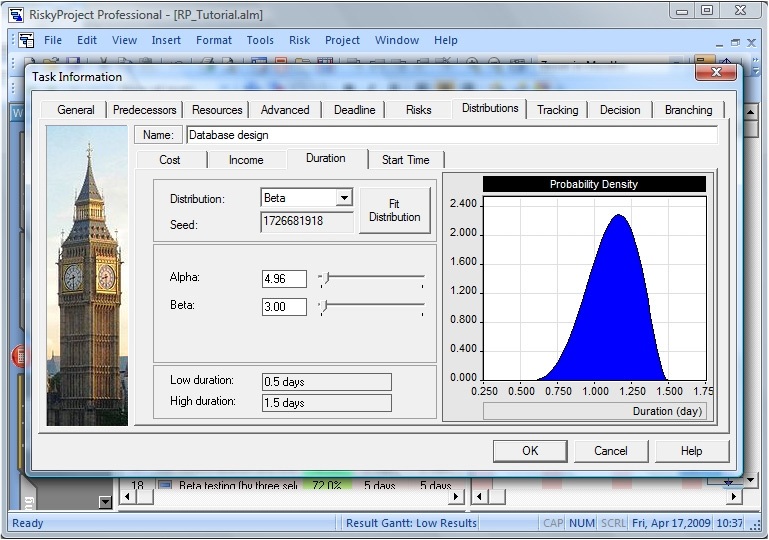
Can I define task duration using statistical distribution?
Yes, you can define task duration, start time, cost, and lag between predecessors and successors using a number statistical distributions. However you must ensure, that uncertainties defined in the distribution are due to different factors than the risks assigned to the same tasks.
-
How does tracking in RiskyProject work?
You can enter a percent of task completion on a certain day. RiskyProject uses this information to calculate a forecasted task duration which takes into account risks and task progress. The actual chance of risk occurrence is automatically updated. You can easily compare the results of tracking with the original (baseline) project schedule.
-
How can I perform Earned Value Management using RiskyProject?
RiskyProject has Cost Analysis view. This view will present you with cashflow diagrams: without risks (deterministic), with risks (probabilistic), and actual (based on tracking data). You can use slider to view cost variance as well as difference between cost with and without risk on each stage of the project. Cost Analysis view is available in both RiskyProject Lite and RiskyProject professional.
-
How should I use the risk register?
You should use the risk register as the central place to define your project's risk break down structure. Once you have added the risks, from the risk register you can:
- Add risk properties (date created, recorder, owner, etc.)
- Assign risks to tasks and resources
- Sort and filter risks
- View risk status, including results of mitigation efforts. Risks can be opened and closed, risk or issues, threats and opportunities.
-
How do I assign risks to tasks?
You can assign risks to task using four methods in RiskyProject.
- Risk Register: If you are using the Risk Register, you can assign a risk and mutually exclusive risk alternatives to tasks by double-click on the risk in the risk register and assigning tasks to the risk in the Assign to tasks or resources tab.
- Global Risk Assignment view: Double click on risk ID in Global risk view and use Assigned to Tasks or Assigned to Resources tab. You may assign these global risk to multiple tasks or resources at the same time. After you make assignment of global risk to specific tasks and resources, global risk assignment will be disabled, otherwise risk will be applied twice.
- Local Risk Assignment views for tasks and resources: By default, this view is not shown in the Risk workflow bar. You can open this view by clicking the All Views button in the Workflow bar and selecting Local Risks (Tasks). This method is useful when you make assignment with the same parameters (chance, outcome, result, and moment of risk) to multiple tasks or resources.
- Risk Tabs on Task Information and Resource Information Dialog boxes: You can create and assign local risks to the task using this method. This is a preferred method of you want to assign few different risks to few separate tasks or resources.
-
How can I update a project schedule from Microsoft Project and keep my assigned risks?
If you use RiskyProject toolbar in Microsoft Project, all risks assigned to the task or resource will be kept even if you update task or resource parameters in Microsoft Project. Please click here for more information.RiskyProject is a project risk management and scheduling software developed by Intaver Institute Inc. The centerpiece of RiskyProject is the uncertainty management functionalities, implemented based on our event chain methodology. You define project schedules similarly to how it is done using other project management software and then define events (risks and management actions) associated with tasks and resources. RiskyProject performs simulations and generates a risk profile of the project. For more information about RiskyProject click here.
When you import (click on Import from File menu) an updated schedule from Microsoft Project, RiskyProject gives you the option of completely overwriting the existing schedule or updating the existing schedule with new data in Microsoft Project, while keep global and local risk assignment. This is useful for if you originally exported the schedule and assigned risks to the project. RiskyProject keeps unique task Ids from Microsoft Project. However, if you even rename task in Microsoft Project, your risks would not be assigned to appropriate tasks, when you import a new schedule to RiskyProject.
-
How do I rank schedule related and non-schedule risks together?
RiskyProject calculates the relative impact of both schedule-related and non-schedule risks in such a manner to provide a valid comparison of both types of risks in regards to potential impact on the project. The basis of this comparison is the relative weight (importance) that you assign to each risk category. You can view the impact (threat or opportunity) of each risk in the Risk Matrix view and Risk Register view. In Global risk assignments view and in Risk Tabs of Task Information Dialog box and Resource Information Dialog box you will find an impact of the risk on all parameters under "All" (Calculated impact on all project parameters) column.
-
How do I plan a risk response?
Risk response planning is done in the Mitigation or Response view on the Risk workflow. Risk responses are activities that will occur in a risk occurs. These activities can be modeled in a similar manner as a risk with an outcome and result. Risk Mitigation and Response view can be useful, if you have many risks causing the same response.
You assign the risk response to a risk as a risk outcome "Execute Response Plan" and the response plan as the result.
For example, you have two risks "Problem with supplier" and "Problem with the component" that will initiate the same response "Replace Component". If you define "Replace Component" and assign it to both risks using the risk outcome "Execute Response Plan", the response plan will be executed only once even if both risks occur together.
-
How can I compare mitigation efforts using different baselines?
There are two methods to view the results of your mitigation planning against the original schedule. To compare the results, first create a baseline using the results from the original schedule. Model the planned mitigation efforts in your current schedule taking into account any additional activities and costs that the mitigation efforts will entail (these may also introduce additional risks) .
In the risk register, use the Configure Pre and Post Mitigation button to select the original baseline as the pre-mitigation and the current schedule as the post-mitigation. The risk register will display the risk impact and score of each risk for the pre and post mitigation schedules.
In the Manage Baselines dialog box, you can compare major project parameters of the two schedules: Duration, Finish Time, Cost, and Success Rate.
-
How many iterations are required in a simulation?
The number of iterations required depends upon the risks you have assigned to the project. Normally, the minimum number of iterations is 200 and can be adequate on small, non-strategic projects. However, if you have risks that have a very low chance of occurring, but have a potential large impact, the results will not account for this risk unless you run sufficient simulations. For example, your project has a 0.5% chance of being cancelled due to political instability. You must run at least 200 iterations, just to ensure just to ensure that the simulation runs a single occurrence of this risk. To adequately model these types of risks, we recommend a minimum of 600 simulations.
-
When should I use a risk event instead of a statistical distribution?
RiskyProject supports both methods of risk analysis. Statistical distribution or uncertainty modeling is recommended in projects where there is strong and analogous historical data that is supported by expert opinion. If this data does not exist, risk event modeling will normally result in a more accurate assessment of your project risk and uncertainty. In addition, risk events make it much easier to identify critical risks through sensitivity analysis as most if not all uncertainty in a project is caused by risk events. Without risk event modeling, you will need to do a root cause analysis to identify which risks are causing the uncertainty in your project.
-
What are mutually exclusive alternatives for risks and how are they calculated in RiskyProject?
Mutually exclusive alternatives are used to calculate alternate outcomes for the same risk event that cannot occur at the same time. An alternative risk is similar to using a Boolean "OR" statement. Only one risk alternative can occur at the same time. For example, if you have a fire risk, the fire could be minor or major each with different outcomes. They are the same risk, but unlike other risk events, these alternatives cannot occur at the same time. In this example, the risk Fire has two alternatives:
Chance Outcome Result 10% Fixed delay 2 days 2% Relative delay 45% When the simulations are run, there is a 12% chance that the risk Fire will occur. 10% of the time the outcome of the minor fire will be calculated, while 2% of the time the outcome of a major fire is calculated, but they are never calculated during the same simulation.

RiskyProject Purchasing and Licensing
-
How much does RiskyProject software cost?
For pricing information click here.
-
Does RiskyProject require purchase of annual maintenance?
No. Maintenance is included. We also have free customer support for life. If you need to purchase an upgrade, please visit the RiskyProject purchase page.
-
Do you have academic and corporate licensing of RiskyProject?
Yes. For more information about academic and corporate licenses please contact Intaver Institute. We offer up to 95% discount for academic licenses and offer an extended trial period. December 2007 Intaver Institute Inc. has launched university relationship program. If universities use RiskyProject software or Event Chain Methodology as part of their educational programs related to risk management or project management, Intaver Institute Inc. offers:
- Technical Support Assistance
- Free licenses Intaver Institute's Products for educational programs
- Web Site Listing
- Marketing Collateral
- Coop-Marketing Opportunities
Click here for more information.
-
Do you accept credit cards for payments?
Yes. We accept Visa and MasterCard. You can use our online store to purchase RiskyProject. We are also accept cheques and money orders that are accompanied by a purchase order.
-
How RiskyProject is licensed?
RiskyProject license is required for each computer. To obtain a license please visit our online store. You read RiskyProject software licensing agreement please click here.
-
I received my RiskyProject license number. How should I validate it?
To learn how to validate your license click here.
-
I have RiskyProject version 2.1. Can I receive RiskyProject 3 free of change?
Yes. All RiskyProject version 2 users will receive RiskyProject 3 free of change. Just download and install it on your computer. You don't need to uninstall RiskyProject 2. However if you are the user of RiskyProject 1 and want to use RiskyProject 3, you have to upgrade the license. For license upgrade information please contact Intaver Institute sales at sales@intaver.com or call us +1(403)692-2252.
-
Can I install both RiskyProject Lite and RiskyProject Professional on the same computer?
If you use RiskyProject 1.3 or early versions, you must install RiskyProject Lite to setup RiskyProject Professional and vice verse. If you use RiskyProject 2 or later, both Lite and Professional versions can be installed on the same computer.
-
I cannot validate my license through Internet. What should I do?
Most likely you use firewall which prevents you from getting a response code from our server. In this case you should send us computer ID and license number and we will send you a response code. To see your computer ID, from the Help menu. choose About RiskyProject and then click the Update License button.
-
How can I obtain a response code if I don't have Internet connection?
You need to have a license number and computer ID. We will supply you with license number. To see your computer ID, from the Help menu. choose About RiskyProject and then click the Update License button. You can obtain a response code using one of the following methods:
- Call us
- Send email to sales@intaver.com
- Go to support on our web site and use support request form.
After you get response code enter it using the same dialog as you use to enter license number.
-
Can I upgrade RiskyProject Lite to the RiskyProject Professional?
Yes. Please contact Intaver Institute Inc. for pricing information. You don't need uninstall RiskyProject Lite to install RiskyProject professional. Both RiskyProject Lite and RiskyProject Professional can work on the same computer. A new license will be required. If you are using trial version of RiskyProject Lite and want to try RiskyProject Professional, a new license is not required within the 30-day trial period.
-
Do I need to download new RiskyProject, if I already have a trial version?
No. the Trial and licensed versions of RiskyProject are the same. If you want to switch from trial to full licensed version of RiskyProject, you will need to purchase a license. Intaver Institute will forward you a license number. When you receive your new license, go to the Help menu. choose About RiskyProject and then click the Update License button in the About RiskyProject dialog box. Enter you license number and validate it (click here for the instructions). After the validation is completed, you need to restart RiskyProject.
-
Can you extend a 30 trial period?
Yes. In some cases we can expand the trial period by issuing a temporary license. Just call us or send e-mail to sales@intaver.com
-
What should I do, if my computer has been reimaged and lost the license or RiskyProject?
Just contact us. We will help you to restore your license information on new or reimaged computer.
-
I use VMWare. How can I obtain new license of RiskyProject when I create a new image?
You have to contact us each time you create new VMWare image with RiskyProject. We will help you to restore your license information.



