Search Help:
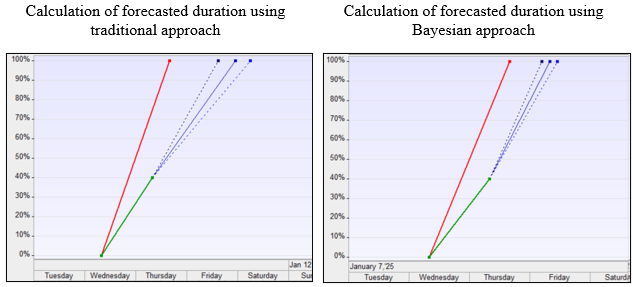
Project Forecasting Using Bayesian AnalysisBayesian Analysis requires an exclusive version of RiskyProject Professional RiskyProject allows forecasting of project and task performance using Bayesian analysis. Bayesian analysis uses the same input data as the traditional analysis described in Calculating and Reassessing Tasks Using Tracking Data: the percent of task completion and the associated status date. However, the actual calculation is performed differently. With the traditional approach, RiskyProject essentially extrapolates actual task performance to estimate future task performance. Using the Bayesian approach, RiskyProject considers two inputs::
For example, a task duration is defined to range between 3 and 6 days, with a most likely duration of 4 days, estimated based on multiple similar tasks executed previously. In the current project, 40% of the tasks have been completed over 3 days. Using the traditional approach, the forecasted task duration would be 8 days. However, using the Bayesian approach, the forecasted duration would be 6 days because the calculation incorporates prior (original) task uncertainties. During the Bayesian analysis process, RiskyProject calculates the distribution of the remaining duration and uses it to determine the total task duration. The Bayesian approach provides a more accurate forecast of task and project duration and is recommended for projects where actual performance tracking is conducted and prior (original) project risks and uncertainties are defined. Bayesian analysis is applied only to uncertainties in task duration and not to fixed costs. Bayesian analysis will have significant effect on project schedules if partially completed tasks have longer duration relative to the overall project duration and are on a critical path. For example, if task duration with uncertainties and tracking data is 2 weeks and project duration is 2 month, and this task is on the critical path, you will see a significant difference in project finish time as a result of Bayesian analysis compared to traditional approach.
Setting Up Bayesian AnalysisTo enable Bayesian Analysis go to File > Options > Calculations and check Bayesian Analysis with Actuals. Results of calculation will be shown on the Tracking Chart view. You can select individual tasks to see results for the task. Alternatively, if no tasks are selected, you can view results for whole project. To view statistical distributions for remaining duration:
See also |