Search Help:
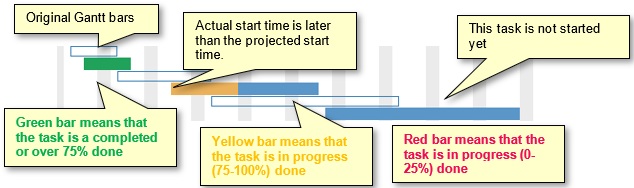
Professional version onlyTracking Gantt Chart ViewYou can use the Tracking Gantt to view the impact that your tracking information has upon the project schedule. It behaves much like the Result Gantt except it shows the percent completed for each task. Below is an example of tracking information as shown in the Tracking view:
The tracking bars can be turned on and off in the Gantt chart. Showing the Baseline and Tracking barsRight-click on the chart and choose Show Current Schedule and/or Tracking Bars from the shortcut menu. See also |